
Key Takeaways
- 302 status code indicates a temporary redirect to another URL.
- The 302 HTTP code should be used only when the redirect is temporary.
- Misusing error code 302 can cause SEO issues such as indexing confusion and reduced ranking signals.
- Proper redirect management ensures a better user experience and search engine crawling.
Introduction
The internet runs on a system of communication between browsers and servers. Whenever you visit a website, your browser sends a request to the server, and the server responds with a status code that tells the browser what happened. One of the most commonly encountered responses is the 302 status code, also known as status 302 found.
The HTTP response code 302 indicates that a requested resource has been temporarily moved to another URL. While this might seem simple, understanding the 302 HTTP code is important for website owners, developers, and SEO professionals. Improper use of HTTPS 302 redirects or error code 302 can affect user experience, search engine indexing, and website performance.
In this blog, we’ll explore what HTTP 302 is, how it works, its causes, and its impact on SEO.
What Is HTTP 302?
The HTTP response code 302 indicates that the requested resource has been temporarily moved to another location. When a server returns an HTTP 302 response code, it instructs the browser to redirect the user to a different URL for that request.
However, unlike a permanent redirect, the HTTP response code 302 signals that the move is temporary. This means search engines and browsers should continue using the original URL for future requests.
For example, if a website page is temporarily unavailable due to maintenance, the server might return status 302 Found and redirect users to a different page until the original page is restored.
In simple terms:
- 301 redirect: Permanent move
- 302 redirect: Temporary move
Because of this temporary nature, HTTP 302 redirects must be used carefully to avoid confusion for search engines and users.
How the 302 HTTP Status Code Works
To understand how the 302 HTTP code works, it helps to look at the basic request-response cycle between a browser and a server.
When a user requests a webpage:
- The browser sends a request to the server.
- The server checks if the requested resource exists.
- If the resource has temporarily moved, the server returns the HTTP response code 302.
- The browser automatically redirects the user to the new URL provided in the response.
This process happens almost instantly, which is why most users never notice when a 302 HTTP return code occurs.
However, behind the scenes, search engines also analyze these redirects to understand how content should be indexed.
Difference Between 301 and 302 Status Codes
One of the most common sources of confusion in SEO is the difference between 301 redirects and the HTTP response code 302.
Both redirect users to another page, but their purposes are different.
301 Redirect
A 301 redirect tells search engines that a page has permanently moved to a new location. As a result, search engines transfer most of the SEO value from the old URL to the new one.
302 Redirect
A 302 HTTP code indicates a temporary redirect. Search engines assume the original page will return, so they usually keep the original URL indexed.
Key Differences
- 301 redirect: Permanent page move
- 302 redirect: Temporary page move
- 301 passes SEO authority: Yes
- 302 passes SEO authority: Usually limited
Understanding this difference helps avoid misusing status 302 found in SEO strategies.
Common Causes of a 302 Status Code
The HTTP response code 302 can appear for several reasons. In many cases, it is intentionally used by developers, but sometimes it occurs due to configuration issues.
Below are the most common causes.
Temporary Page Relocation
A website might temporarily redirect users to another page while updates or maintenance are happening.
Examples include:
- Website maintenance pages
- Temporary promotional landing pages
- Short-term product pages
In these situations, using HTTP 302 is appropriate because the original page will eventually return.
A/B Testing or Website Experiments
Some companies run experiments by redirecting users to different versions of a webpage.
For example:
- Testing two landing page designs
- Trying different call-to-action buttons
- Measuring conversion rate changes
During these experiments, developers often use 302 HTTP redirects so the original page remains indexed by search engines.
Login Redirects
Many websites redirect users after login or authentication.
For example:
- Redirecting users to a dashboard after login
- Redirecting unauthorized users to login pages
These temporary redirects commonly generate a 302 HTTP return code.
Misconfigured Server Settings
Sometimes, error code 302 occurs unintentionally due to server configuration issues.
Possible causes include:
- Incorrect redirect rules
- CMS configuration errors
- Plugin conflicts
In these cases, the 302 status code may appear repeatedly and create redirect loops.
Improve Your Website’s SEO Health
We help businesses resolve technical SEO issues and optimize website performance for better search visibility.
SEO Impact of the 302 HTTP Code
The SEO impact of the HTTP response code 302 depends largely on how it is implemented.
Because the response code 302 represents a temporary redirect, search engines may not transfer full link equity or ranking signals to the redirected page.
Limited Link Equity Transfer
Because a 302 HTTP code indicates a temporary redirect, search engines may not transfer full ranking signals to the redirected page.
This means the target page might not receive the full SEO benefits.
Indexing Confusion
If a 302 status code is used incorrectly for a permanent move, search engines may continue indexing the old URL instead of the new one.
This can cause:
- Duplicate content issues
- Ranking instability
- Incorrect page indexing
Crawl Budget Issues
Excessive 302 redirects can also affect crawl efficiency. Search engines must follow multiple redirects before reaching the final page, which may reduce the crawl budget available for other pages.
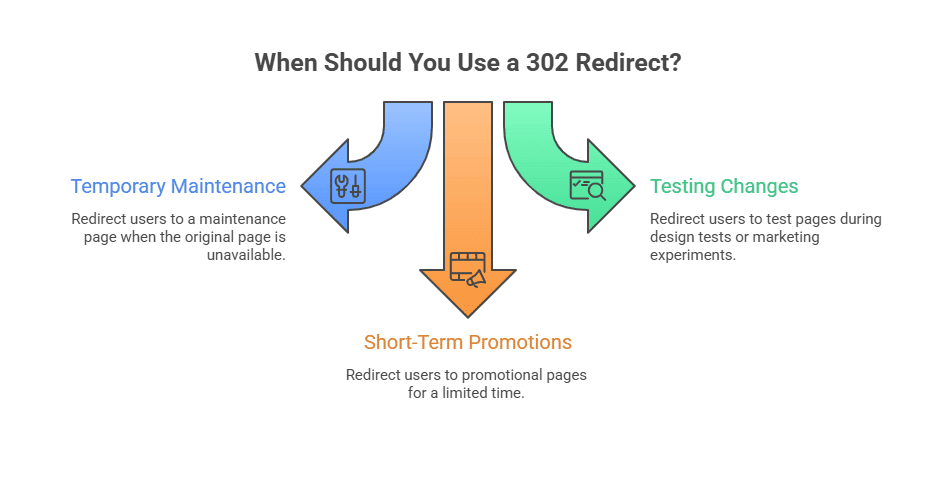
When Should You Use a 302 Redirect?
Although the HTTP response code 302 should be used carefully, it is still useful in certain situations.
For example, during temporary website maintenance or short-term campaigns, the HTTP response code 302 allows users to access alternate pages without permanently changing the original URL.
Temporary Website Maintenance
If a page is temporarily unavailable, a 302 status code can redirect users to a maintenance page.
Testing Website Changes
During design tests or marketing experiments, HTTP 302 redirects allow developers to send users to test pages without permanently changing URLs.
Short-Term Promotions
Companies sometimes redirect users to promotional pages for a limited time. Once the campaign ends, traffic returns to the original page.
How to Fix or Manage Error Code 302
If you encounter error code 302 unexpectedly, there are several ways to troubleshoot it.
Check Redirect Rules
Review server configuration files such as:
- .htaccess
- Nginx configuration
- CMS redirect settings
Incorrect rules may be causing the 302 HTTP code.
Inspect Plugins and Extensions
If your website uses a CMS like WordPress, certain plugins may automatically generate 302 redirects.
Disabling or updating plugins can resolve these issues.
Use Website Crawling Tools
SEO tools can help identify redirect issues.
Common tools include:
- Screaming Frog
- Google Search Console
- Ahrefs site audit
These tools detect redirect chains and status 302 found responses.
The Future of HTTP Redirect Handling
Search engines have improved how they interpret redirects over time.
Modern search engines sometimes treat 302 redirects similarly to permanent redirects if they remain in place long enough. However, best practice still recommends using the correct redirect type.
As websites become more dynamic and interactive, understanding HTTP response codes like the 302 HTTP code will remain essential for both developers and SEO professionals.
Conclusion
The HTTP response code 302 helps websites manage temporary redirects and guide users to alternate pages during maintenance, testing, or short-term campaigns. When used correctly, the 302 HTTP code ensures users reach the right content without permanently changing the original URL. However, improper use of status 302 found can create SEO issues such as indexing confusion or reduced ranking signals.
For businesses, understanding HTTP response codes is essential for maintaining website performance and search visibility. Wildnet Marketing Agency helps brands manage technical SEO challenges, resolve issues like error code 302, and optimize website performance to build a stronger and more search-friendly online presence.
Frequently Asked Questions
Q.1 What is HTTP 302?
Ans: HTTP 302 is a temporary redirect response code that tells browsers to access a resource at a different URL for the current request.
Q.2 What does status 302 found mean?
Ans: Status 302 found means the requested page has temporarily moved to another URL, but may return to its original location later.
Q.3 Is a 302 redirect bad for SEO?
Ans: A 302 redirect is not bad if used correctly for temporary changes, but misusing it for permanent redirects can cause SEO problems.
Q.4 What is the difference between 301 and 302 redirects?
Ans: A 301 redirect is permanent, while a 302 redirect is temporary.
Q.5 What causes error code 302?
Ans: Common causes include temporary redirects, login redirects, A/B testing, or server configuration errors.
Q.6 How do I fix a 302 HTTP return code?
Ans: Check redirect rules, server settings, plugins, or CMS configurations to identify the source of the redirect.
Q.7 Does HTTPS 302 affect SEO?
Ans: An HTTPS 302 redirect can affect SEO if used incorrectly, especially when a permanent redirect should be used instead.