
The HTTP 409 status code is one of the most misunderstood HTTP response codes, yet it plays a critical role in modern web applications, APIs, and SEO-sensitive platforms. If you’ve encountered an error message related to a conflict request and wondered what went wrong, this guide explains everything you need to know — from technical causes to real-world fixes.
In this in-depth guide, you’ll learn what the HTTP 409 status code means, why it occurs, how it differs from similar errors, how it impacts SEO, and most importantly, how to resolve it correctly without harming user experience or search visibility.
Quick Summary
The HTTP 409 status code (also known as the 409 error code) occurs when a request cannot be completed due to a conflict with the current state of the target resource. It is most common in APIs, CMS platforms, collaborative systems, and version-controlled environments.
Key takeaways:
- The 409 error is conflict-based, not syntax-based
- It often appears in REST APIs, form submissions, and CMS updates
- Incorrect handling can impact performance and SEO
- A structured technical approach is required to fix it
What Is the HTTP 409 Status Code?
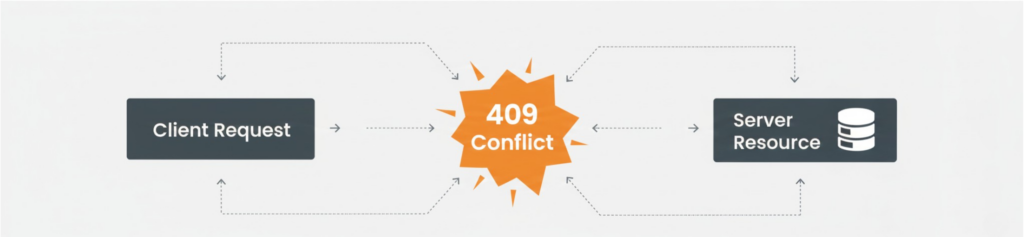
The HTTP 409 status code indicates that the server understood the request, but it cannot process it because doing so would create a conflict with the current state of the resource.
In simple terms, the request is valid — but the timing or state is not.
Official Definition
A request conflict occurs when the current state of the resource prevents the request from being completed.
This makes the 409 status code different from client-side errors like 400 or authorization issues like 401.
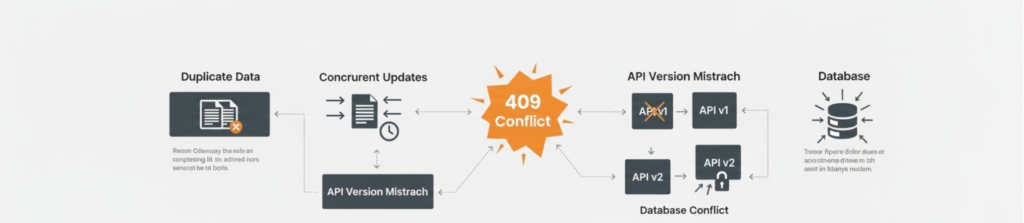
Common Causes of a 409 HTTP Code
Understanding why a 409 HTTP code appears is the first step toward resolving it properly.
1. Resource State Conflicts
- Updating a resource that has already been modified
- Submitting outdated data
- Concurrent edits by multiple users
2. Duplicate Requests
- Creating a resource that already exists
- Re-submitting forms without validation
3. API Versioning Issues
- Mismatched API payloads
- Invalid object states in REST APIs
4. CMS & Database Conflicts
- Content already published or deleted
- Database constraints being violated
409 Status Code Example (Request & Response)
Below is a simplified example of how a 409 status code appears in an API interaction.
Request
POST /users HTTP/1.1
Content-Type: application/json

{
  "email": "user@example.com"
}
Response
HTTP/1.1 409 Conflict
Content-Type: application/json

{
  "error": "User already exists"
}
In this case, the request is valid — but the system prevents duplication.
How to Fix a 409 HTTP Status Code
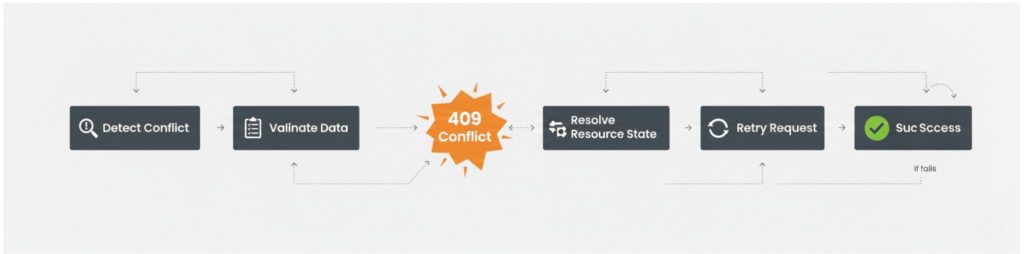
Fixing the HTTP 409 status code requires identifying the conflict source rather than masking the error.
Step-by-Step Fix Process
1. Identify the Conflict Source
- Review server logs
- Check API request payloads
- Verify database constraints
2. Validate Client-Side Logic
- Prevent duplicate submissions
- Implement version checks (ETags)
3. Resolve the Conflict Programmatically
- Update or merge conflicting data
- Prompt users to refresh or retry
4. Return Clear Error Messaging
- Explain why the request failed
- Provide actionable next steps
HTTP 409 vs Other Status Codes
Understanding how the 409 HTTP status code differs from similar errors helps avoid misdiagnosis.
| Status Code | Meaning | Key Difference | SEO Effect |
|---|---|---|---|
| 400 | Bad Request | Syntax issue | Can reduce crawl efficiency if triggered frequently |
| 409 | Conflict | Resource state issue | Indirect impact via UX issues, form failures, and engagement drop |
| 412 | Precondition Failed | Header-based mismatch | May block proper rendering or updates if misconfigured |
| 422 | Unprocessable Entity | Semantic error | Can affect conversions but usually minimal SEO impact |
Does the 409 Error Code Affect SEO?
Indirectly, yes.
While the 409 error code is not a crawl-blocking error like 404 or 500, frequent unresolved conflicts can cause:
- Broken user flows
- Incomplete form submissions
- Poor engagement signals
- Indexing inefficiencies
From an SEO perspective, these issues can negatively impact crawlability, Core Web Vitals, and overall site trust.
This is where a comprehensive technical SEO audit service becomes critical — it helps uncover hidden HTTP conflicts that affect both users and search engines.
How Wildnet Marketing Agency Fixes 409 Status Code Issues
Resolving a 409 status code requires more than a quick patch — it demands a deep understanding of server behavior, APIs, databases, and SEO implications.
At Wildnet Marketing Agency, we take a structured, technical-first approach:
- Full server-side and API conflict analysis
- Database and CMS state validation
- HTTP response mapping and optimization
- Integration with a complete technical SEO audit service
- Long-term monitoring to prevent recurrence
Our approach doesn’t just fix the HTTP 409 status code — it strengthens your website’s technical foundation, improves user experience, and protects search visibility.
Why Businesses Trust Experts for HTTP Conflict Resolution
Most development teams fix symptoms, not root causes. Persistent 409 HTTP code errors often indicate deeper architectural or workflow issues.
Businesses that work with experienced technical teams benefit from:
- Faster issue resolution
- Reduced downtime
- Improved API stability
- SEO-safe implementations
This is especially important for eCommerce platforms, SaaS products, and content-heavy websites.
Best Practices to Prevent 409 Status Code Errors
- Use optimistic locking in APIs
- Implement version control checks
- Validate user inputs server-side
- Monitor logs proactively
- Run periodic technical audits
Prevention is always more cost-effective than reactive fixes.
Frequently Asked Questions (FAQs)
Q.1 What does the HTTP 409 status code mean?
Ans. The HTTP 409 status code means the request could not be completed due to a conflict with the current resource state.
Q.2 Is a 409 error code a client or server error?
Ans. It is classified as a client error (4xx), but the root cause often lies in server-side logic.
Q.3 How is a 409 status code different from 412?
Ans. A 409 status code relates to resource conflicts, while 412 is tied to failed preconditions like mismatched headers.
Q.4 Can 409 errors hurt SEO?
Ans. Indirectly yes — unresolved conflicts can harm user experience and engagement, which impacts SEO performance.
Q.5 How can I permanently fix 409 HTTP errors?
Ans. A combination of proper API handling, database validation, and a professional technical SEO audit service ensures long-term resolution.
Conclusion
The HTTP 409 status code is not a bug — it’s a signal. When handled correctly, it helps maintain data integrity and system stability. When ignored, it creates friction, frustration, and lost opportunities.
If your website or application is experiencing recurring 409 error code issues, resolving them with a strategic, technical approach can protect both performance and growth.