Are you noticing a sudden drop in your Instagram engagement, likes, and reach? If your posts aren’t showing up in hashtag searches or the Explore page, you might be dealing with a shadowban. In this comprehensive guide, we’ll dive deep into how to get unshadowbanned on Instagram, including proven steps to lift the restriction quickly and ensure it doesn’t happen again. Whether you’re a creator, business owner, or casual user, understanding how to unshadow ban Instagram can restore your visibility and help you thrive on the platform in 2026. We’ll cover everything from detection to prevention, drawing from the latest algorithm insights and real-user experiences.
How to Remove Shadow Ban on Instagram in 2026?
In 2026, Instagram’s algorithm has evolved with advanced AI-driven detection for spam and violations, making shadowbans more sophisticated but also easier to address if you act swiftly. Meta’s latest transparency reports highlight that over 366 million pieces of spam content were actioned in the first half of 2025 alone, emphasizing the platform’s focus on authentic engagement.
If you’re searching for how to get unshadowbanned on Instagram in 2026, the first step is identifying the root cause—often linked to automation, banned hashtags, or community guideline breaches. Many users report recovery in 7–21 days after applying the right fixes consistently. The good news? Instagram’s updated Account Status feature now provides more detailed insights into restrictions, making how to get unshadowbanned on Instagram much clearer than in previous years.
Understanding Instagram’s 2026 Visibility Limits: Why It Happens Now More Than Ever
Instagram’s algorithm in 2026 prioritizes original, viewer-satisfying content while aggressively filtering spam, inauthentic activity, and low-quality signals. What feels like a “shadowban” is often “recommendation limits” or “reduced discoverability” triggered by AI detecting patterns like bot-like behavior, recycled content, or guideline edges.
Recent changes emphasize:
- AI-powered originality checks — Fully AI-generated or heavily reposted content gets deprioritized.
- Engagement quality over quantity — Fake likes, comment pods, or rapid actions flag accounts faster.
- Viewer retention signals — If people swipe away quickly, reach drops across the board.
True restrictions usually happen when multiple violations stack up — and that’s when knowing how to get unshadowbanned on Instagram becomes critical.
First: Are You Actually Shadowbanned? (Quick & Honest Check)
Before fixing anything, confirm it’s not just low engagement or a temporary algorithm dip.
- Check Your Account Status (Instagram’s Official Tool) Go to Profile > Menu (three lines) > Settings > Account > Account Status. Look for any red flags in categories like “What you can’t recommend” or “Removed content.” If everything is green but your reach is tanked — it’s likely a soft limit (what most call shadowban). This feature is more reliable in 2026 and shows violations directly.
- The Real Hashtag Visibility Test (Most Accurate Method)
- Post a new photo or Reel with ONE unique, made-up hashtag (e.g., #MyTestReach2026XYZ — something no one else uses).
- Wait 1-2 hours.
- Ask 2-3 friends (who DON’T follow you) to search that exact hashtag on a different device/phone. If your post doesn’t appear in “Recent” — you’re probably limited. (Pro tip: Don’t use this on your main account if you’re testing multiple times — it can look spammy.)
Many users confuse normal algorithm changes (like prioritizing original Reels) with shadowbans. If Account Status is clean and the test passes, focus on better content instead.
Why This Happens in 2026 (The Real Reasons Behind the Drop)
Instagram’s AI is smarter now — it detects spam, inauthentic activity, and low-quality signals faster than ever.
Common triggers include:
- Using third-party apps/bots for likes/follows/comments.
- Overusing the same hashtags repeatedly (especially if they’re flagged).
- Posting too frequently or doing mass actions (e.g., 100+ likes in minutes).
- Reposting TikTok videos with watermarks or non-original content.
- Getting multiple reports from users (even if content seems fine).
- Borderline guideline violations (spam-like captions, excessive emojis, or sensitive topics without warnings).
The platform prioritizes original, viewer-loved content — if your posts feel spammy or recycled, reach gets throttled silently.
First: Are You Actually Shadowbanned? (Quick & Honest Check)
Before fixing anything, confirm it’s not just low engagement or a temporary algorithm dip.
- Check Your Account Status (Instagram’s Official Tool) Go to Profile > Menu (three lines) > Settings > Account > Account Status. Look for any red flags in categories like “What you can’t recommend” or “Removed content.” If everything is green but your reach is tanked — it’s likely a soft limit (what most call shadowban). This feature is more reliable in 2026 and shows violations directly.
- The Real Hashtag Visibility Test (Most Accurate Method)
- Post a new photo or Reel with ONE unique, made-up hashtag (e.g., #MyTestReach2026XYZ — something no one else uses).
- Wait 1-2 hours.
- Ask 2-3 friends (who DON’T follow you) to search that exact hashtag on a different device/phone. If your post doesn’t appear in “Recent” — you’re probably limited. (Pro tip: Don’t use this on your main account if you’re testing multiple times — it can look spammy.)
Many users confuse normal algorithm changes (like prioritizing original Reels) with shadowbans. If Account Status is clean and the test passes, focus on better content instead.
Why This Happens in 2026 (The Real Reasons Behind the Drop)
Instagram’s AI is smarter now — it detects spam, inauthentic activity, and low-quality signals faster than ever.
Common triggers include:
- Using third-party apps/bots for likes/follows/comments.
- Overusing the same hashtags repeatedly (especially if they’re flagged).
- Posting too frequently or doing mass actions (e.g., 100+ likes in minutes).
- Reposting TikTok videos with watermarks or non-original content.
- Getting multiple reports from users (even if content seems fine).
- Borderline guideline violations (spam-like captions, excessive emojis, or sensitive topics without warnings).
The platform prioritizes original, viewer-loved content — if your posts feel spammy or recycled, reach gets throttled silently.
How to Remove Shadowban on Instagram (Steps Each Definable)
Getting unshadowbanned requires a methodical approach. Here’s a step-by-step guide based on proven methods from 2026 updates, including Meta’s latest tools for account reviews. Aim to complete these within 48-72 hours for faster recovery.
Step 1: Stop All Violating Activities Immediately
Halt any behavior flagged as spammy. This includes using bots for likes/follows, posting too frequently (e.g., more than 10 posts/day), or engaging in mass actions. In 2026, Instagram’s AI detects patterns like rapid commenting—pause for at least 48 hours to reset flags. Switch to manual, genuine interactions to rebuild trust.
Step 2: Revoke Access to Third-Party Apps and Bots
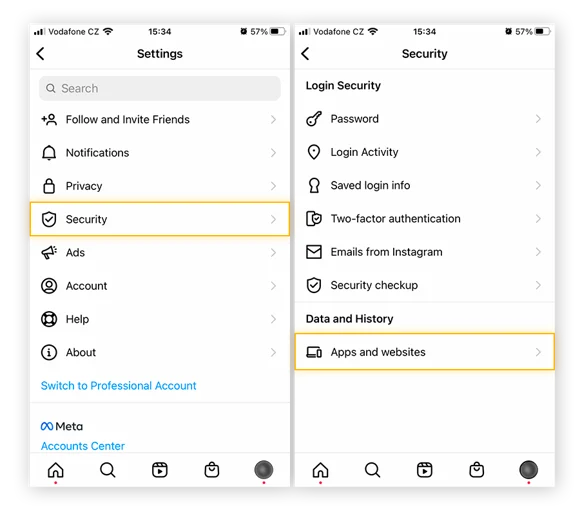
Many shadowbans stem from unauthorized apps.
Go to Profile > Menu > Settings > Security > Apps and Websites.
Revoke permissions for any suspicious tools, especially automation services. Users report instant improvements after this step, as Meta cracked down on 10 million fake profiles linked to bots in 2025.
Step 3: Audit and Remove Banned or Restricted Hashtags
Hashtags like #alone or #workflow can be temporarily banned if overused in spam. Search each hashtag in the app—if a warning appears, it’s flagged. Edit recent posts to remove them (up to 30 per post max). Use tools like Instagram’s search or third-party checkers sparingly. In 2026, focus on niche, relevant tags under 100K posts for better reach. Hashtag misuse is a top reason people tend to find how to get unshadowbanned on Instagram permanently.
You can check out the latest Instagram hashtags for 2026.
Step 4: Delete or Edit Violating Content
Review your feed for posts breaching guidelines (e.g., hate speech, nudity, or spam). Delete or archive them. If content was reported, appeal via Account Status. This cleans your profile and signals compliance to the algorithm.
Step 5: Take a Strategic Break from Posting
Pause posting for 3-14 days to allow the algorithm to recalibrate. During this time, engage lightly—respond to DMs, watch Stories, but avoid over-liking. Many recover in 7 days; extend if needed. This cooldown period is a proven tactic in nearly every real-world case study on how to get unshadowbanned on Instagram.
Step 6: Report the Issue to Instagram Support
Use the in-app feature: Profile > Menu > Settings > Help > Report a Problem. Describe your reach drop and request a review. For pros, check Professional Dashboard > Account Status for violations and appeal directly. In 2026, Meta’s improved support responds faster to genuine appeals.
Step 7: Boost Organic Engagement Post-Recovery
Once lifted, post high-quality Reels (Instagram favors them in 2026) and encourage shares. Collaborate with creators for cross-promotion. Monitor Insights weekly to catch early drops.
For permanent fixes, combine these with prevention—users who follow through report 2-3x reach increases long-term.
How to Prevent Shadowban on Instagram? (8 Tips + Latest 2026 Additions)
Prevention is easier than cure. Here are the original 8 tips, expanded with trendy 2026 insights like AI content detection and Reels optimization. Ethical AI usage and retention-first content play a huge role in avoiding repeat issues related to how to get unshadowbanned on Instagram.
- Adhere to Instagram’s Rules: Always follow community guidelines—avoid fake engagement or illegal promotions.
- Avoid Reports: Post respectful content; use content warnings for sensitive topics to minimize flags.
- Ditch Autobots: Grow organically; 2026 AI spots bots instantly, leading to permanent restrictions.
- Steer Clear of Banned Hashtags: Research via search; limit to 5-10 relevant ones per post.
- Create Trending, Engaging Content: Leverage Reels and Carousels—Instagram’s algorithm boosts original videos in 2026.
- Add Content Warnings: For graphic posts, this reduces reports and shows responsibility.
- Don’t Buy Followers: Fake growth is detectable; focus on collaborations instead.
- Avoid Spamming: Space out actions; no more than 60 follows/unfollows per hour.
Additional Trendy Tips for 2026:
- Embrace AI Ethically: Use Instagram’s built-in AI tools for editing, but avoid fully generated content—Meta penalizes unoriginal posts.
- Prioritize Reels and Live: With algorithm favoring short-form video, aim for 3-5 Reels weekly to build momentum.
- Monitor Meta’s Transparency Reports: Check quarterly updates for new spam trends to stay ahead.
- Switch to Creator/Business Accounts: Gain Insights and avoid personal account pitfalls; 2026 features include advanced analytics for early detection.
Official Instagram Community Guidelines
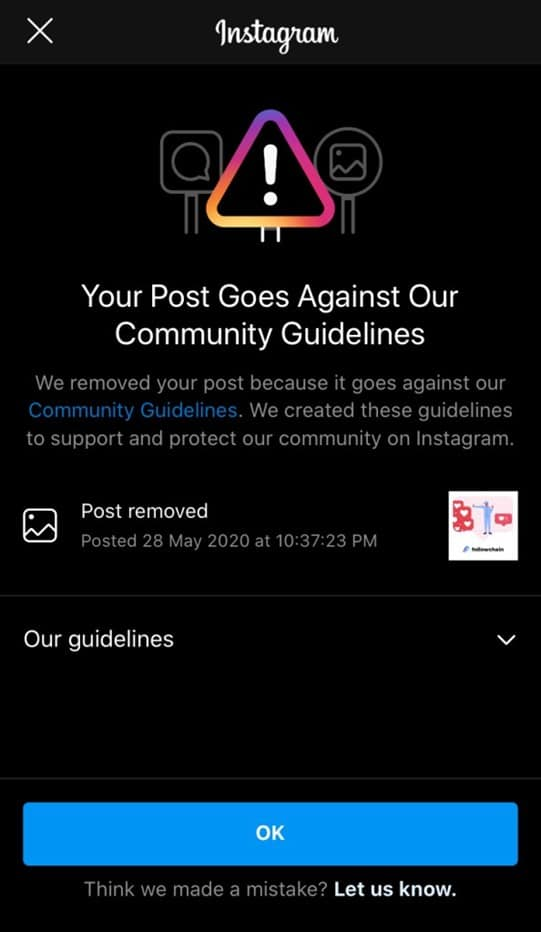
Instagram’s guidelines promote authenticity and safety. Key rules (updated 2026):
- Authentic Content: Share original photos/videos; no plagiarism or AI-fakes without disclosure.
- No Harmful Behavior: Avoid hate speech, harassment, violence, or self-injury promotion.
- Genuine Interactions: Ban on bots, fake likes, or bought followers.
- Legal Compliance: No illegal sales (e.g., drugs, weapons) or terrorism endorsement.
- Sensitive Content: Use warnings for graphic material; nudity is restricted except in art/education.
- New 2026 Additions: Stricter AI detection for manipulated content; emphasis on environmental misinformation bans.
Violations lead to reduced reach or account removal. Full details at Instagram’s Help Center.
How to Never Get Hit Again: Prevention Tips That Actually Work Now
Once recovered, protect your account:
- Post original content — no watermarks, no mass reposts.
- Limit actions: <30-40 likes/comments per hour.
- Use relevant, fresh hashtags (research weekly).
- Engage like a real person — build community, not numbers.
- Check Account Status weekly.
- Switch to Creator/Business for better analytics (but don’t flip-flop).
- Focus on saves/shares over likes — 2026 algorithm rewards retention.
- Avoid buying followers or joining engagement groups — AI spots them instantly.
What to Do After Recovery – Supercharge Your Reach & Grow Faster in 2026
You’ve followed the steps, waited patiently through the reset, and finally — your reach is climbing back up! The shadowban (or reduced visibility) is lifting, but this is NOT the time to relax. Many people make the mistake of jumping back into old habits, only to get hit again within weeks.
This section is all about the smart comeback phase: how to rebuild momentum safely, boost your reach even higher than before, and turn this frustrating experience into your strongest growth period yet.
1. Start Slow & Test Everything (The “Soft Launch” Strategy)
Don’t flood your feed right away. Instagram’s algorithm is watching closely after a restriction.
- Week 1 post-recovery: Post only 1 high-quality Reel or Carousel per day (max). Focus on original content created in-app — no TikTok watermarks, no reposts.
- Use 3-5 super-niche hashtags only (under 50K-100K posts). Test one unique test hashtag (#YourNameRecoveryTest2026) to confirm visibility.
- Track every post in Insights: Look at reach from non-followers, watch time, and saves/shares (these matter most in 2026).
If numbers look good after 3-4 days, slowly increase to 2 posts/day. This gradual ramp-up proves to the algorithm you’re authentic — not a bot suddenly reactivated.
2. Shift to What the 2026 Algorithm Loves Most (Retention-First Content)
Instagram now prioritizes viewer retention over raw likes. If people watch your Reels fully, rewatch, save, or share — your reach explodes.
Quick wins to boost this:
- Strong hooks in the first 3 seconds — Ask a question, show a surprising fact, or tease the end result.
- End with action: “Save this if you’re trying it!” or “Tag a friend who needs this!” — saves and shares are gold.
- Use trending audio + your original twist — But add your voiceover or unique edits to stand out.
- Go Live weekly — Even 10-15 minutes. Lives signal real human activity and boost overall account trust.
Many users report 2-3x reach increases just by focusing on completion rate instead of follower count.
3. Build Real Community (The Long-Term Secret Weapon)
After a shadowban, your existing followers become your biggest asset — nurture them!
- Reply to every single comment in the first 24 hours (shows engagement quality).
- Use Stories polls, questions, and quizzes daily — even simple ones like “Which one next?” Keep interaction flowing.
- Collaborate with similar small-mid accounts (shoutouts, takeovers) — genuine collabs send strong positive signals.
- Create content series (e.g., “Tip Tuesday”, “Behind the Scenes”) — people come back for more, improving retention.
This turns passive followers into active fans — the algorithm notices and pushes your content further.
4. Use Built-in Tools & Insights Like a Pro
Switch to (or stay on) a Creator or Business account for these advantages:
- Weekly check Account Status — Catch tiny flags early.
- Monitor “Accounts Reached” and “Net New Followers” in Insights (newer 2026 metrics help spot trends fast).
- Experiment with Instagram Edits (the built-in editor) for pro-level Reels with voice enhancement, effects, and direct posting — it keeps everything clean and original.
Pro tip: Export your Insights summary monthly — track progress and adjust.
5. When to Consider Ads or Paid Boosts (Safely)
Once stable (2-3 weeks of good organic signs), boost your best-performing Reel with a small budget ($5-10/day). Choose “More reach” or “More profile visits” — this can accelerate growth without looking spammy.
Avoid boosting during the first week post-recovery — let organic signals rebuild first.
Final Motivation: This Could Be Your Turning Point
A shadowban feels awful, but many creators say their accounts came back stronger after fixing it — better content habits, real engagement, and sustainable growth.
You’re not starting over; you’re upgrading.
Stick to authentic, value-packed content. Check Insights weekly. Be patient for 2-4 weeks. Your reach will not just recover — it can surpass what it was before.
Keep creating — the algorithm rewards consistency and real connections in 2026. Your audience is waiting!
FAQs About Instagram Shadowban
Q.1 How long does an Instagram shadowban last?
Ans. Typically 7-14 days, but up to months if unaddressed. Act fast for quicker lifts.
Q.2 What are the main reasons for shadowban on Instagram?
Ans. Violations, bots, banned hashtags, spam behavior, or reports. In 2026, add AI-detected plagiarism.
Q.3 How can I avoid getting shadowbanned on Instagram?
Ans. Follow guidelines, engage genuinely, use ethical tools, and post quality content.
Q.4 What are the main community guidelines?
Ans.Authenticity, no harm, genuine interactions—see above for details.
Q.5 What happens if somebody reports my Instagram account?
Ans. Multiple reports can trigger reviews, leading to shadowbans or suspensions.
Q.6 Can I appeal an Instagram shadowban?
Ans. Yes, via Report a Problem or Account Status—Meta reviews genuine cases.
Q.7 Is there a new way to detect shadowbans in 2026?
Ans. Use the enhanced Account Status with AI insights for precise violation info.
Q.8 Does switching account types help?
Ans. Yes, Creator/Business accounts offer better tools for monitoring and recovery