Key Takeaways
- Stitch AI by Google transforms simple text prompts or sketches into functional UI designs and front-end code, accelerating the design and development process.
- The Google Stitch app uses advanced AI models from Google Labs to generate web and mobile interfaces, helping designers, developers, and startups prototype faster.
- Features like text-to-UI generation, sketch conversion, and automatic code export make Stitch Google UI a powerful tool for rapid product design and experimentation.
- As AI tools evolve, platforms like Stitch by Google could redefine how digital products are built, reducing design barriers and enabling faster innovation.
Introduction
The development of digital products now faces major changes through the current advancements in artificial intelligence. AI tools enable faster and more accessible creative work through their capabilities, which cover both code writing and image generation. The latest development in this field involves Stitch AI, which Google Labs created as an experimental tool that changes basic concepts into complete user interface (UI) designs.
Often referred to as Stitch by Google, this new platform allows designers, developers, and even beginners to generate app or website layouts using simple prompts or images. Instead of manually designing every button or layout element, Stitch AI’s Google technology can automatically create UI designs and corresponding front-end code in minutes.
In this blog, we’ll explore what Google Stitch is, how it works, its key features, and why it could reshape UI design and development.
What Is Google Stitch?
Google Stitch is an AI-powered UI design tool that Google Labs developed as part of its product offerings. The tool enables users to create entire user interface designs together with their corresponding front-end code through two methods: they can either describe their needs, or they can upload an image or sketch.
The Google Stitch application provides users with a solution that connects design work to the development processes of their projects. Users can start their app development process by using plain English to describe their app concepts. The system will create all necessary elements, including layout design, component creation, and styling design, through automated processes.
For example, you could type a prompt like:
“Create a minimalist finance dashboard with blue accents and rounded cards.”
Within seconds, Stitch AI Google generates a full UI layout with navigation menus, buttons, and visual structure.
The tool was introduced at Google I/O 2025 and uses advanced AI models from Google’s Gemini family to interpret prompts and create responsive interface designs.
Why Google Built Stitch AI
Designing digital products traditionally involves several stages:
- Creating wireframes
- Designing UI components
- Converting designs into code
- Testing and refining the interface
This process can be slow and requires collaboration between designers and developers.
Google Labs Stitch was created to simplify this workflow. By using AI to generate both UI designs and front-end code, the tool reduces the time needed to move from idea to prototype.
The goal is simple:
- Make design accessible to beginners
- Speed up app development
- Reduce repetitive design tasks
- Improve collaboration between design and engineering teams
In short, Stitch by Google aims to turn ideas into working prototypes quickly.
Turn AI Innovation Into Real Digital Growth
We help businesses combine AI tools, UX-focused development, and advanced SEO strategies to build scalable digital products and stronger online visibility.
How Stitch AI Works
The Google Stitch UI system is powered by Google’s Gemini AI models, which understand both text and visual inputs. This allows Stitch to generate designs from natural language descriptions or sketches.
Let’s look at the core workflow.
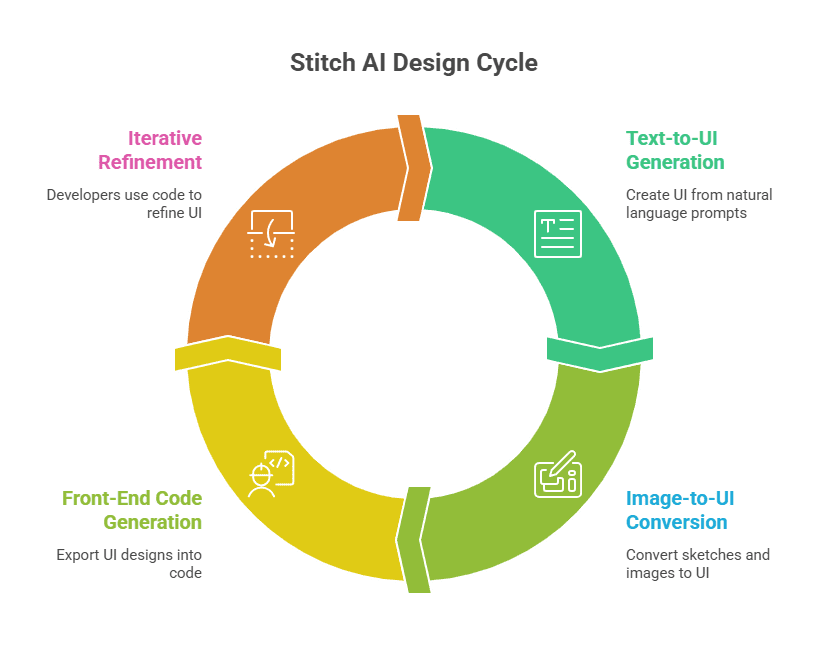
1. Text-to-UI Generation
One of the most powerful features of AI Stitch is its ability to generate UI layouts from simple prompts.
You can describe the interface you want in natural language, and Stitch creates the design automatically. The system determines layout structure, colour schemes, fonts, and component hierarchy based on the prompt.
This makes it possible to generate app designs without deep knowledge of UI design tools.
2. Image-to-UI Conversion
Another impressive feature of Google Labs Stitch is converting sketches or images into functional UI layouts.
Users can upload:
- Hand-drawn wireframes
- Screenshots of existing apps
- Whiteboard sketches
Stitch analyzes the image and recreates the layout as editable UI components.
This is especially useful during early brainstorming stages.
3. Automatic Front-End Code Generation
Unlike many design tools that only generate visuals, Stitch AI Google also produces front-end code.
The platform can export UI designs into:
- HTML
- CSS
- Figma files
This means developers can directly use the generated code as a starting point for building the actual application.
Key Features of Stitch AI
The Stitch app includes several features designed to simplify design workflows.
1. Prompt-Based Interface Design
Users can create interfaces using simple text prompts. Stitch interprets these prompts and generates layouts automatically.
2. Sketch-to-Design Conversion
Upload rough sketches or screenshots, and Stitch converts them into structured UI designs.
3. Multiple UI Variations
Stitch can generate several variations of the same design concept, allowing users to experiment with different layouts and styles.
4. Web and Mobile Design Support
The tool supports UI generation for both mobile apps and web interfaces.
5. Export to Code and Design Tools
Designs can be exported to HTML/CSS or Figma, making it easier for developers and designers to continue refining the project.
6. Conversational Editing
Users can refine designs through simple instructions like:
- “Change the theme to dark mode.”
- “Add a sidebar navigation.”
- “Make the buttons rounded.”
Stitch Google UI: Standard Mode vs Experimental Mode
One interesting feature of Google Stitch UI is that it offers different working modes depending on the complexity of your project.
| Feature | Standard Mode | Experimental Mode |
|---|---|---|
| Purpose | Designed for quick UI generation and rapid prototyping | Built for more complex UI design and detailed layout generation |
| AI Model Used | Uses lighter Gemini Flash models for faster responses | Uses more advanced AI models for deeper design analysis |
| Input Type | Works mainly with text prompts describing the interface | Supports both text prompts and image-based inputs |
| Best Use Case | Ideal for brainstorming ideas and early-stage design exploration | Best for converting sketches, wireframes, or screenshots into UI layouts |
| Speed | Faster generation with simpler layouts | Slightly slower but produces more detailed and refined designs |
| Design Complexity | Suitable for simple app layouts and quick concepts | Better for complex UI structures and polished interface designs |
This flexibility allows Stitch AI to support both quick experimentation and more advanced interface development, depending on the user’s needs.
Who Can Use Stitch AI?
Although the Stitch app is powered by advanced artificial intelligence, it is designed to be accessible to a wide range of users. The goal of Stitch by Google is to simplify UI creation so both technical and non-technical users can bring their ideas to life quickly.
Developers
Developers can use Stitch AI’s Google technology to generate UI prototypes quickly instead of manually building layouts from scratch. This helps them focus more on functionality and application logic rather than repetitive design work.
UI/UX Designers
For designers, Stitch Google UI tools make it easier to explore different layout ideas and design concepts. Instead of spending hours creating wireframes, designers can generate multiple variations instantly.
Startups
Startups often operate with limited resources. The Google Stitch app allows founders and product teams to test product ideas without hiring large design or development teams.
Beginners
Even users with little or no design experience can experiment with digital product ideas using Google Labs Stitch. The tool simplifies the design process through natural language prompts.
Real-World Use Cases of Google Stitch
The Stitch app can be applied in many practical scenarios where rapid design and prototyping are required. By using the Stitch app, teams can quickly transform ideas into functional interface layouts.
Rapid Prototyping
One of the most valuable uses of Stitch AI Google tools is rapid prototyping. Teams can generate interface concepts within minutes and evaluate them before committing to full development.
Product Design Experiments
Design teams can use Stitch by Google to experiment with multiple UI styles and layouts. This encourages creative exploration and faster design iteration.
Startup MVP Development
For startups building Minimum Viable Products (MVPs), Google Labs Stitch helps accelerate the process by generating ready-to-use interface concepts.
Learning UI Design
Students and beginners can use Stitch Google UI generation to understand how modern interfaces are structured.

Advantages of Stitch AI
The rise of AI Stitch tools brings several advantages.
Faster Product Development
The emergence of the Stitch app highlights how artificial intelligence can simplify the design process and improve efficiency across product development teams.
Faster Product Development
By generating layouts automatically, Stitch AI’s Google technology significantly reduces the time required to move from idea to prototype.
Improved Collaboration
With Stitch by Google, designers and developers can work from the same AI-generated design framework, making collaboration smoother.
Lower Design Barriers
One of the biggest advantages of AI Stitch tools is that they make design more accessible to people without specialized skills.
Limitations of Stitch AI
While the Stitch app offers powerful capabilities, it is still an evolving technology and comes with certain limitations.
Experimental Stage
Currently, Google Labs Stitch is still in its experimental phase. This means features may change as Google continues to improve the platform.
Design Customization Limits
Although Stitch Google UI generation creates strong starting points, designers may still need to refine layouts manually.
Dependency on Prompts
The quality of output from Stitch AI Google depends heavily on the clarity of user prompts.
Despite these challenges, Stitch shows strong potential to transform design workflows.
The Future of Stitch AI
Google is already improving Stitch AI’s capabilities with more advanced AI models. Recent updates aim to introduce features like interactive prototypes, allowing designers to connect screens and simulate real app workflows.
As AI technology evolves, tools like Stitch could eventually handle much larger portions of the design and development process.
In the future, we may see:
- Fully functional app prototypes generated instantly
- AI-driven UI optimization
- Better integration with development frameworks
Conclusion
Stitch AI represents a major step forward in AI-powered design tools. By turning simple prompts, ideas, or sketches into complete UI layouts and front-end code, Stitch by Google makes digital product design faster and easier. The Google Stitch app allows designers, developers, and startups to quickly move from concept to prototype using AI-driven workflows from Google Labs Stitch.
As AI continues transforming digital innovation, businesses must adapt to stay competitive. Wildnet Marketing Agency helps brands leverage emerging technologies from AI tools to advanced SEO strategies to build scalable digital products and stronger online visibility, turning innovation into measurable growth.
Frequently Asked Questions
1. What is Stitch AI by Google?
Stitch app is an experimental design tool from Google Labs that generates user interface designs and front-end code from text prompts, sketches, or images.
2. What is Google Stitch used for?
The Stitch app helps designers and developers quickly create UI layouts for websites and mobile apps without starting from scratch.
3. How does Stitch AI work?
Stitch app Google technology uses advanced AI models to analyze text descriptions or images and automatically generate structured UI designs and corresponding front-end code.
4. Is Google Stitch available to everyone?
Currently, Google Labs Stitch is in an experimental phase and may have limited access depending on region and availability.
5. Can the Stitch app generate code for apps?
Yes, Stitch by Google can generate front-end code such as HTML and CSS, making it easier for developers to build prototypes quickly.
6. Who should use the Google Stitch app?
The tool is useful for UI/UX designers, developers, startups, product managers, and beginners who want to quickly create and test interface ideas.
7. How is Stitch app different from traditional design tools?
Unlike traditional tools, AI Stitch generates designs automatically using AI prompts, reducing manual design work and speeding up the product development process.