
Key Takeaways
- Sora OpenAI features enable text-to-video creation with scene understanding and cinematic motion.
- The ChatGPT Sora feature makes video generation conversational and easier to refine.
- There are real Sora limits and safety guidelines that shape how the tool can be used.
- OpenAI Sora Turbo and Sora Plus show rapid improvements in speed, quality, and scalability.
Introduction
Artificial intelligence is changing how we create content, and the latest leap is into video. According to industry estimates, by 2026, AI-generated video could account for over 30% of all online video content, driven by tools that make video creation faster and more accessible than ever before. Just as ChatGPT transformed text creation, new AI models are now simplifying video creation from a single text prompt.
One of the most exciting of these tools is Sora OpenAI, which promises to bring text-to-video generation into the mainstream. Built by OpenAI, Sora represents a massive step forward in generative AI, and in this guide, we’ll break down Sora OpenAI features, what Sora can do, how it works with ChatGPT, its limits, guidelines you need to know, and the latest upgrades like OpenAI Sora Turbo and Sora Plus.
What Is Sora OpenAI?
Sora OpenAI features center around transforming simple text descriptions into fully rendered video clips. The platform enables users to create videos through written descriptions, which Sora converts into visual content. The system operates like text-to-image models, but it enables users to create animated scenes.
The system creates new visual content without needing pre-existing footage or standard video editing materials. The process enables users to create complete video content through their scene descriptions, which Sora then transforms into visual media. Sora revolutionizes video production, much as ChatGPT transformed writing.
How Sora Works with ChatGPT
One of the most talked-about aspects of Sora is how it integrates with ChatGPT.
Here’s how the ChatGPT Sora feature works in simple terms:
- You type a prompt into ChatGPT describing the video you want.
- ChatGPT helps refine your idea, suggesting improvements or clarifications.
- Once the prompt is ready, ChatGPT sends it to Sora.
- Sora generates the video based on that refined prompt.
This makes video creation feel like a conversation, not a technical process. ChatGPT helps shape your idea, and Sora brings it to life.
The synergy is powerful; instead of learning complex editing tools, users can simply talk to ChatGPT and watch their video concept get created.
Key Sora OpenAI Features
Let’s take a deeper look at the most important Sora OpenAI features and why they matter for creators, businesses, and developers.
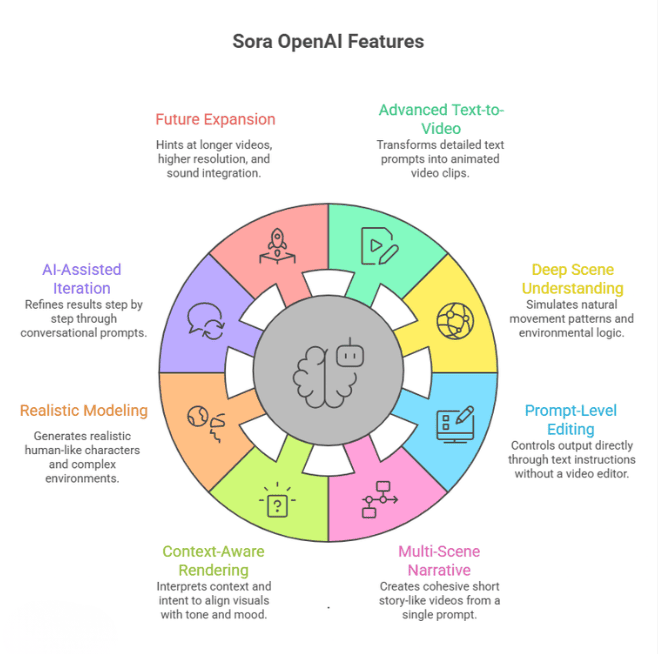
1. Advanced Text-to-Video Generation
Sora transforms detailed text prompts into fully animated video clips. But this isn’t just basic animation. You can describe:
- Characters and their physical appearance
- Facial expressions and emotions
- Movements and interactions
- Environment details (urban, fantasy, nature, futuristic)
- Cinematic pacing and storytelling tone
For example, instead of writing:
“A dog running in a park.”
You can write:
“A golden retriever joyfully running through a sunlit park during golden hour, slow-motion, cinematic camera angle.”
Sora attempts to interpret the style, lighting, movement, and mood — not just the objects.
This is what makes it a leap beyond AI image tools. It handles:
- Motion continuity
- Frame transitions
- Temporal consistency
- Story progression
In simple terms, Sora doesn’t just create pictures; it creates sequences.
2. Deep Scene Understanding & Physics Awareness
One of the most impressive Sora OpenAI features is its ability to interpret how a scene should behave.
Instead of generating isolated frames, Sora tries to simulate:
- Natural movement patterns
- Object interactions
- Environmental logic
- Perspective and spatial depth
For example:
- If you describe rain falling, droplets move downward naturally.
- If a person walks, Sora attempts to animate limb movement realistically.
- If objects collide, it tries to reflect the physical interaction.
This “scene awareness” gives videos a more cinematic and coherent feel.
While it’s not perfect and may still struggle with complex physics or fine details, it’s significantly more advanced than earlier generative video experiments.
3. Prompt-Level Editing & Creative Control
Another strong Sora OpenAI feature is the ability to control output directly through text instructions.
You don’t need a video editor interface. Instead, you guide the video by adjusting your prompt.
You can control:
- Camera movement (zoom, pan, tracking shot, aerial view)
- Speed (slow motion, time-lapse, real-time)
- Lighting (moody, neon, daylight, dramatic shadows)
- Visual style (realistic, animated, painterly, sci-fi)
- Scene mood (romantic, suspenseful, energetic)
This makes Sora highly accessible.
Even non-editors can experiment with cinematic storytelling by simply describing what they want. It removes technical friction and puts creativity first.
4. Multi-Scene Narrative Generation
Sora isn’t limited to single-frame ideas. It can interpret multiple actions in one cohesive prompt.
For example:
“A woman opens a café in the morning, arranges pastries on the counter, then welcomes the first customer with a smile.”
Instead of generating unrelated short clips, Sora attempts to create:
- Logical sequencing
- Character continuity
- Smooth transitions
- Time progression
This allows users to create short story-like videos, not just animated fragments.
For marketers and creators, this is extremely valuable for:
- Short ads
- Social media storytelling
- Concept demos
- Product previews
It’s a step closer to AI-driven micro filmmaking.
5. Context-Aware Rendering
Sora doesn’t treat prompts as isolated instructions. It tries to interpret context and intent.
For example, if you write:
“A quiet village at dawn.”
Sora may interpret:
- Soft lighting
- Calm atmosphere
- Warm sunrise tones
- Slow camera movement
If you write:
“A chaotic futuristic city during a thunderstorm.”
It may generate:
- Fast motion
- Dramatic lighting
- Neon reflections
- Intense weather movement
This contextual intelligence is what separates Sora from older experimental models that simply stitched visuals together. It attempts to align visuals with tone, mood, and narrative cues.
6. Realistic Character & Environment Modeling
Another notable Sora OpenAI feature is its effort to generate realistic human-like characters and complex environments.
It can attempt to simulate:
- Facial expressions
- Eye direction
- Clothing movement
- Detailed backgrounds
- Urban and natural landscapes
Although realism isn’t perfect yet, the model is designed to improve spatial consistency and visual fidelity over time.
This makes it useful for:
- Concept visualization
- Pre-production storyboarding
- Creative experiments
- Product idea demos
7. AI-Assisted Iteration & Refinement
Sora works especially well when paired with conversational refinement (like via ChatGPT).
Users can:
- Adjust prompt details
- Refine tone and pacing
- Simplify or complicate scenes
- Add cinematic direction
This iterative process makes Sora flexible. Instead of getting stuck with one output, creators can improve results step by step, just by refining their description . This lowers the barrier to professional-looking video generation.
8. Foundation for Future Expansion
Many experts believe Sora is just the beginning.
Future expansions could include:
- Longer video duration
- Higher resolution rendering
- Sound and voice integration
- Character persistence across scenes
- Interactive AI-generated video
With upgrades like OpenAI Sora Turbo and Sora Plus, the system is clearly being optimized for better performance, faster rendering, and higher quality outputs. The roadmap suggests Sora could evolve into a complete AI video production platform.
OpenAI Sora Turbo & Sora Plus — What’s the Difference?
OpenAI is releasing updated versions of Sora to make the tool faster and more capable:
OpenAI Sora Turbo
Sora Turbo focuses on speed and efficiency:
- Faster render times
- Smoother playback
- Reduced latency for iterative prompts
This is ideal for creators who want quick results or need to generate many variations rapidly.
Sora Plus
Sora Plus is expected to deliver:
- Higher fidelity videos
- Longer durations
- More complex scene generation
- Priority access for higher-tier users
Sora Plus is essentially the “premium” version of the text-to-video experience aimed at professionals and enterprises. Note that both variants are designed to be more capable than the base Sora engine.
| Feature | OpenAI Sora Turbo | Sora Plus |
| Primary Focus | Speed and efficiency | Quality and advanced capabilities |
| Render Time | Faster render times | Standard to slightly longer (higher quality output) |
| Playback Performance | Optimized for smoother playback | Optimized for visual fidelity |
| Prompt Iteration | Reduced latency for rapid testing and refinements | Designed for more complex, detailed scene generation |
| Video Quality | High quality with speed priority | Higher fidelity and enhanced realism |
| Video Duration | Short-form optimized | Longer video durations supported |
| Scene Complexity | Best for simple to moderate scenes | Handles more complex, layered scenes |
| Target Users | Creators needing quick variations and rapid output | Professionals, agencies, and enterprise users |
| Access Level | Performance-optimized tier | Premium / higher-tier access |
| Best Use Case | Social media content, quick drafts, experimentation | Marketing campaigns, storyboards, professional production concepts |
Sora Limits: What It Can and Can’t Do
While Sora is powerful, it has real Sora limits you should understand. It can struggle with complex physics, precise hand movements, long-duration videos, and detailed character consistency. It may misinterpret complicated prompts or generate visual inaccuracies. Resolution and clip length are also restricted, and ethical guidelines limit certain types of content creation.
1. Resolution & Length Constraints
Current versions generate short clips (often just a few seconds) at moderate resolution. Longer cinematic scenes are still beyond reach.
This means:
- Expect short output
- Not yet suitable for feature-length production
- Best for social content, previews, storyboards
2. Detail and Accuracy
Sora tries to follow your prompt, but:
- It may misinterpret ambiguous details
- Characters and objects can look stylized or unexpected
- Complex motion scenes may appear choppy
In other words, perfect realism is still a future milestone.
3. Ethical & Safety Guidelines
OpenAI enforces Sora guidelines to prevent misuse. This includes restrictions like:
- No deepfakes or impersonation content
- No violent, harmful, or explicit scenes
- Respecting intellectual property
- Avoiding sensitive or harmful subject matter
These limits are essential for safe public use and ethical deployment.
Curious How Sora Can Fit Into Your Marketing Strategy?
AI tools like Sora Turbo and Sora Plus are reshaping video creation — but knowing how to use them strategically is key. Our Experts Help You Transform Concepts into High-Impact Visual Campaigns.
Practical Uses of Sora OpenAI Features
The real value of Sora OpenAI features is not just in impressive demos, but in how they can improve workflows, reduce production costs, and speed up content creation. Here’s how Sora can be used meaningfully across industries:
1. Social Media Content Creation
Short-form video dominates platforms like Instagram, YouTube Shorts, and TikTok. With Sora, creators can generate visual stories directly from text prompts instead of relying on filming equipment, locations, or actors.
How this helps:
- Speeds up content production cycles
- Reduces dependence on physical shoots
- Enables quick testing of multiple creative concepts
For example, a creator could type:
“Minimalist workspace transformation from messy desk to clean setup in 10 seconds”
Instead of organizing and filming the scene, Sora generates a visual concept instantly. This helps creators experiment faster and maintain consistent posting schedules.
2. Storyboarding & Concept Prototyping
For filmmakers, agencies, and creative teams, pre-production is often expensive and time-consuming. Sora can act as a rapid visualization tool.
Instead of describing scenes verbally in meetings, teams can:
- Generate draft scenes from scripts
- Visualize character movement
- Experiment with camera angles
This reduces ambiguity between creative teams and clients. It also allows faster approvals before investing in real production budgets. In early ideation phases, Sora functions as a digital storyboard assistant.
3. Learning & Educational Demonstrations
Educational content benefits greatly from visual explanations. Sora can generate short animated scenes that demonstrate processes or concepts.
Examples:
- Showing how the water cycle works
- Simulating historical scenes
- Demonstrating scientific principles
Rather than relying only on static slides or stock footage, educators can create custom visual demonstrations tailored to their lesson. This improves engagement and retention, especially for visual learners.
4. Marketing & Advertising Testing
Marketing teams constantly test new ideas before launching campaigns. Sora allows marketers to:
- Visualize ad scripts before shooting
- Create concept videos for pitch decks
- Test storytelling angles
For example, before investing in a full commercial shoot, a brand can generate a rough AI version of the idea to evaluate tone, pacing, and visual style. This reduces risk and improves creative decision-making.
5. Product Demonstrations & Explainers
Startups and SaaS companies can use Sora to create mock product scenarios or demo environments when real-world footage isn’t available.
Instead of waiting for final UI or hardware builds, teams can:
- Visualize usage scenarios
- Show hypothetical product interactions
- Demonstrate customer journeys
This is especially helpful in early-stage product marketing.
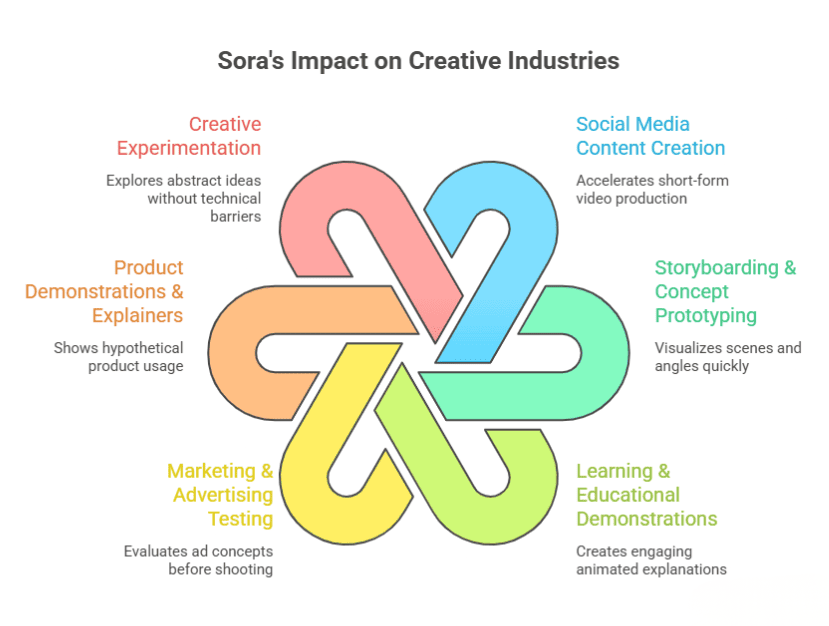
6. Creative Experimentation
Artists, designers, and storytellers can use Sora as a creative playground. It allows rapid visualization of abstract ideas without the need for animation software or editing skills.
Because Sora interprets context and motion, creators can explore:
- Mood variations
- Cinematic lighting changes
- Narrative pacing
This encourages experimentation without technical barriers. In practical terms, the biggest advantage of Sora is speed. It compresses the idea-to-visual timeline dramatically. While it doesn’t replace professional video production yet, it acts as a powerful creative accelerator across social media, education, advertising, and early product storytelling.
The Future of AI Video With Sora
Sora represents the first wave of truly generative video AI that’s accessible to everyday users. Instead of relying on stock footage or manual editing, creators soon will be able to produce tailored, context-aware clips with just a few lines of text.
As the technology improves, especially with versions like OpenAI Sora Turbo and Sora Plus, we can expect:
- Longer video generation
- Better character animation
- More precise scene control
- Integration with other AI tools (voice, music, interactive elements)
It’s a new frontier in creative content generation.
Conclusion
Sora OpenAI features are ushering in a new era of video creation, one where ideas become visuals with minimal technical barriers. By combining the imagination of language with the power of visual generation, Sora is redefining how businesses, creators, and learners produce video content. What once required cameras, crews, and complex editing software can now begin with a well-written prompt.
While there are still some limitations today, the pace of improvement is remarkable. Innovations like Sora Turbo and Sora Plus show that AI video generation is rapidly evolving from experimental demos into practical, everyday creative workflows.
For brands, this shift opens powerful new possibilities. Agencies like Wildnet Marketing Agency are already exploring how Sora can accelerate campaign ideation, ad concept visualization, and scalable content production. By blending AI-driven creativity with strategic digital marketing expertise, they help businesses turn ideas into high-impact visual campaigns faster and more efficiently.
AI has already transformed writing. With Sora, it’s now transforming video, and the brands that adapt early will lead the next wave of digital storytelling.
FAQ
1. What are Sora OpenAI features?
Ans. Sora OpenAI features include text-to-video generation, multi-scene support, contextual scene understanding, and prompt-based video editing controls.
2. What is the Sora function in ChatGPT?
Ans. The Sora function in ChatGPT refers to OpenAI’s text-to-video capability that allows users to generate short cinematic videos from written prompts.
3. What are the current Sora limits?
Ans. Sora limits include shorter video duration, occasional physics inaccuracies, complex motion errors, and restrictions based on safety guidelines.
4. What is OpenAI Sora Turbo?
Ans. OpenAI Sora Turbo is an optimized version designed for faster video generation and smoother rendering performance.
5. What is OpenAI Sora Plus?
Ans. OpenAI Sora Plus typically refers to advanced or premium access that may include improved quality, higher generation limits, or additional creative controls.
6. Can businesses use Sora for marketing?
Ans. Yes, businesses can use Sora to prototype ads, create social media visuals, test campaign ideas, and speed up creative production workflows.
7. Is Sora better than traditional video production?
Ans. Sora doesn’t fully replace professional production yet, but it significantly reduces time and cost for concept visualization and short-form content creation.