Key Takeaways
- Google Time Machine visualizes history, allowing users to explore how places evolved through AI-powered historical imagery.
- It has real-world applications across education, urban planning, environmental research, and real estate.
- The SEO Time Machine concept mirrors this idea, using past performance data to guide future digital growth.
- With expert partners like Wildnet Marketing Agency, businesses can turn historical SEO insights into sustainable visibility and long-term success.
Introduction
Imagine if you could literally travel back in time to see how your city looked years ago. No DeLorean or flux capacitor required, just your phone or laptop. That’s exactly what the Google Time Machine does. This powerful feature, now integrated into Google Maps and Google Earth, lets you explore how cities, neighbourhoods, and even nature have changed over the decades, all through historical imagery enhanced by artificial intelligence (AI).
In a world where data is king and visuals connect people instantly, this tool isn’t just fun for nostalgia; it’s becoming a valuable resource for professionals, researchers, students, and digital marketers alike. In this blog, we’ll break down what Google Time Machine is, how it works, and why it matters even for SEO experts and online strategists exploring the emerging concept of an SEO Time Machine.
What Is Google Time Machine?
The Google Time Machine is a feature within tools like Google Maps and Google Earth that lets users view archived images of locations from different years. It’s like seeing the world’s past alongside the present by sliding through visual history from old to new.
Powered by billions of photos and strengthened by AI, this isn’t just a static photo archive. It’s interactive. You can virtually walk through a neighbourhood from 20 or even 80 years ago, compare it with today, and witness change in motion.
This opens up possibilities that go far beyond casual browsing, making it useful for fields from urban planning to real estate, education to environmental research. We’ll explore these later.
How Does Google Time Machine Actually Work Behind the Scenes?
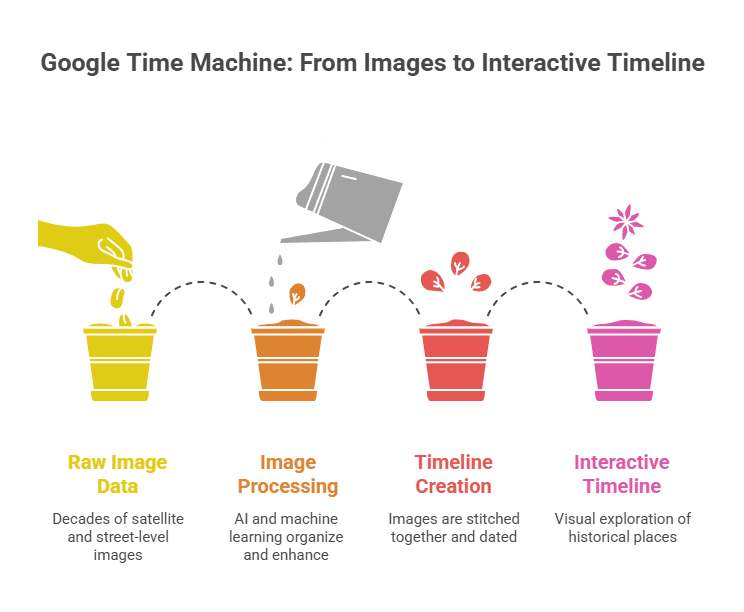
Behind the scenes, Time Machine in Google combines decades of satellite and Street View imagery with AI, machine learning, and cloud processing to organize, enhance, and present historical visuals in an interactive timeline.
1. Historical Image Archives
Google has collected street-level and satellite images for decades. These are stitched together and dated, forming a visual timeline of places worldwide.
2. AI and Machine Learning
Artificial intelligence plays a central role. It helps recognize patterns in images, organizes them by date, fills in gaps, and enhances clarity. The result is a seamless transition through time, almost like watching an old city film play out.
3. Interactive Interface
You don’t just see one photo from the past, you explore it. A timeline slider lets you drag through different years, and 360° views let you look around as if you stood in that place years ago. Think of it like a digital time portal: intuitive, visual, and powered by decades of data.
How Google Time Machine Is Useful in the Real World
Google Time Machine goes beyond curiosity by supporting urban planning, education, environmental research, real estate analysis, and personal exploration through clear visual timelines of real-world change.
1. Rediscover Your Own Memories
Have you ever wondered what your childhood street used to look like? With Time Machine in Google, you can type in any address and scroll back, seeing things like an old local store, a demolished building, or a once quiet park now surrounded by skyscrapers.
2. Urban Planning and Development
Urban planners and architects can study how cities evolve. From the rise of skyscrapers to highway expansions, this tool provides visual timelines of infrastructure changes, helping professionals make decisions grounded in real historical trends.
3. Environmental Research
Climate scientists and environmentalists can see how coastlines erode, forests shrink, or urban areas expand over the years. This visual perspective reinforces data with undeniable imagery useful in reports and presentations.
4. Education and History
Teachers and students exploring subjects like geography, history, or cultural change can see progression. Instead of reading about how a city grew, they can watch it happen through real imagery.
5. Real Estate Insights
People involved in property markets use this feature to check historical neighbourhood trends, helping estimate future growth or simply understand how a city’s face has changed over time.
Key Features of Google Time Machine
These features are what truly make Time Machine in Google a powerful research tool while still being simple and enjoyable for everyday users. From casual exploration to professional analysis, each feature adds a unique layer of value.
1. Historical Timeline Slider
The historical timeline slider functions as the main component for Time Machine in Google. The system lets users access different years, which enables them to see how a particular location has developed throughout history. The slider enables users to observe the exact times when important events occurred while they watch both urban streets and natural environments.
2. Immersive 360° Views
Google Time Machine provides users with 360-degree views of multiple locations instead of showing them traditional two-dimensional pictures. Users can explore different directions through their current location in the same way that they navigate through modern Street View. The experience enables users to feel as though they are experiencing history firsthand, which transforms learning about historical events into a more interactive experience.
3. Side-by-Side Comparison
The side-by-side comparison feature makes it easy to view past and present images together. This is especially useful for spotting subtle changes that might otherwise go unnoticed, such as road widening, building renovations, or shifts in landscape usage. It provides immediate visual clarity without requiring technical analysis.
4. Environmental Change Tracking
Time Machine in Google is particularly valuable for tracking environmental changes. Users can observe how forests shrink, coastlines erode, rivers shift, or glaciers retreat over time. These visual timelines help communicate the impact of climate change and urban expansion more effectively than raw data alone.
5. Property & Real Estate Research
For property buyers, investors, and real estate professionals, this feature offers historical context about neighbourhood development. By reviewing past imagery, users can see how an area evolved, whether infrastructure improved, and if surrounding development supports long-term value or growth potential.
6. Infrastructure Development Insights
Time Machine in Google clearly shows when major infrastructure projects appeared or changed. Roads, flyovers, metro lines, bridges, and public buildings can be tracked across years. This is useful for urban planners, researchers, and even residents curious about how their city’s connectivity developed.
7. Land Use Documentation
This feature helps document how land use has shifted over time. Users can watch open land or farmland slowly transform into residential colonies, industrial areas, or commercial hubs. It provides visual evidence of urbanization and changing land priorities.
8. Nostalgic Revisit
The ability to access personal memories from the past stands as the most powerful emotional connection. Users can browse their past locations, which include their childhood homes and schools, former workplaces and their favourite gathering areas. The Time Machine in Google preserves visual records of sites which have undergone transformation or permanent loss because it shows their historical appearance.
9. Educational Learning Tool
Google Time Machine serves as a visual learning resource which helps both students and educators. The study of history and geography, together with environmental studies, becomes interactive when students observe environmental changes through their visual displays. This method helps students comprehend and remember information better when they learn complicated subjects.
10. Improved Image Quality Over Time
Google uses advanced processing technology to enhance historical images, which begin with low resolution. The passage of time improves historical visual content, which becomes clearer and more usable for researchers who study past environments.
11. Social Sharing for Storytelling
Time Machine in Google makes it easy to capture and share historical views of locations. These visuals are ideal for storytelling on blogs, presentations, documentaries, or social media. They help creators and researchers communicate change in a compelling, visual way.
12. Virtual Tours of Lost Landmarks
Many buildings, landmarks, and streets no longer exist in their original form. Time Machine in Google enables virtual exploration of these lost or redesigned places, preserving cultural and architectural history that would otherwise be forgotten.
13. Urban Growth Visualization
Urban Growth Visualization The tool provides an exact depiction of urban expansion through all of history. The users are able to track population increases together with suburban development and the results of city planning activities. The current urban design of contemporary cities exists because of historical development processes which created their present-day urban footprint.
14. Cultural and Historical Context
The process of physical transformation serves as an indicator of fundamental cultural and economic changes that exist within a society. Users discover how public spaces, landmarks and neighbourhoods changed throughout the years, which helped to create different social and economic patterns and new ways of life.
15. Easy Access for Everyday Users
Google Time Machine provides advanced technological features yet maintains a design which enables all users to navigate its system. The Google Maps and Google Earth users can explore historical views through three simple steps because the system requires no specialized skills.
Turn Your SEO Data Into a Growth Timeline
Turn your past SEO data into smarter strategies for future growth.
What Does Google Time Machine Have to Do With SEO?
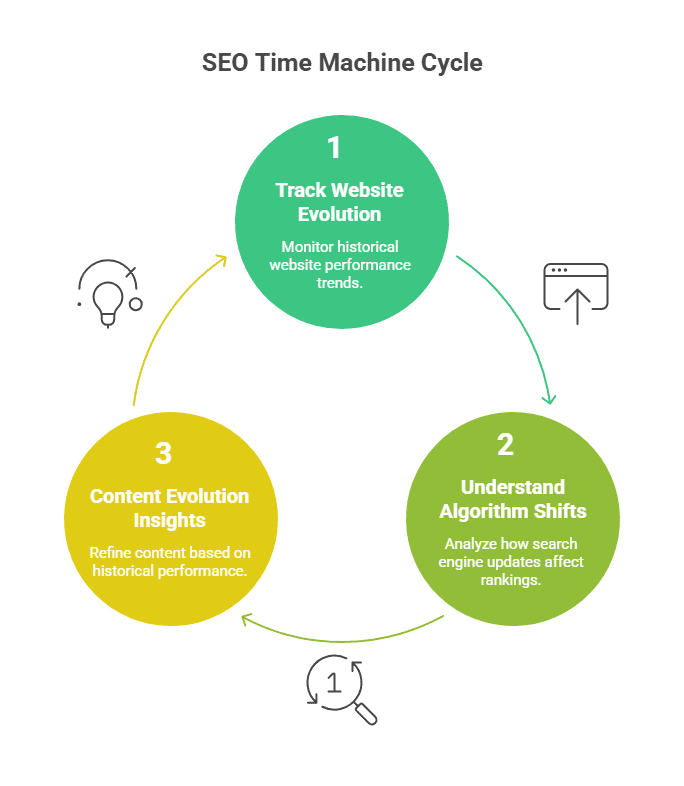
Just like Time Machine in Google reveals physical changes over time, an SEO Time Machine uses historical search data to track ranking trends, understand algorithm impacts, and plan smarter future SEO strategies.
Here’s how the time-travel concept connects to SEO:
1. Tracking Website Evolution
Just like Time Machine in Google shows how places evolve, an SEO Time Machine helps you see how your website’s search performance has changed over time. Using historic metrics and trends, you can travel back to past ranking performance to uncover patterns.
This concept can help you answer questions like:
- When did my keyword traffic start rising?
- What changed before a big drop in rankings?
- Which content once performed well, and why?
Managers use tools like Google Search Console and SEO platforms to build a historical timeline of site performance, much like the way Time Machine shows images through the years. Data becomes a time machine in itself.
2. Understand Algorithm Shifts
Search engines constantly update. Some updates, like BERT, Hummingbird, or more recent AI-driven ranking features, change how sites are evaluated. Watching how your SEO performance shifted before and after a Google update gives clues about what the search engine now values.
In this way, SEO specialists effectively travel through SEO history to understand trends exactly, the mindset behind an “SEO Time Machine”.
3. Content Evolution Insights
Looking back at older content that used to rank but doesn’t anymore reveals valuable SEO lessons. Perhaps language changed, search intent evolved, or a competitor improved quality. Reflecting historically helps you refine future strategies.
Conclusion
Time Machine in Google is more than just a feature; it connects the past and present by turning static data into interactive visual stories. Powered by AI and machine learning, it helps users explore decades of change across cities, landscapes, and communities, adding valuable context for historians, planners, students, and curious explorers.
In the digital world, the idea of an SEO time machine follows the same approach. By analyzing past rankings, traffic, and content performance, businesses can make smarter, future-ready decisions.
This is where Wildnet Marketing Agency plays a key role. By combining SEO expertise, data intelligence, and strategic planning, Wildnet helps brands turn historical insights into sustainable online growth and long-term visibility.
FAQ
Q 1. What is Time Machine in Google used for?
Time Machine in Google is used to view historical images of locations, helping users understand how cities, landscapes, and infrastructure have changed over time.
Q 2. Is Time Machine in Google the same as Google Earth historical imagery?
Yes, Time Machine in Google works through Google Maps and Google Earth, using historical satellite and Street View imagery in a timeline format.
Q 3. How far back in time can the Time Machine in Google go?
The available timeline depends on location, but some areas offer imagery going back several decades, especially major cities and landmarks.
Q 4. Can Time Machine in Google be used for research or education?
Absolutely. It is widely used for urban planning, environmental studies, geography, history education, and real estate research.
Q 5. Is Time Machine in Google free to use?
Yes, Time Machine features are available for free through Google Maps and Google Earth in supported locations.
Q 6. What is an SEO Time Machine?
An SEO Time Machine is a strategic approach that uses historical SEO data—rankings, traffic, and content performance to guide future optimization decisions.
Q 7. How does Time Machine in Google relate to SEO strategy?
Both rely on historical analysis. Just as Time Machine in Google shows physical changes over time, SEO history reveals performance patterns that inform smarter strategies.